
Fix a form that shows twice after a Canva embed
If your form shows up twice after you paste a Canva embed code into BCL, the code has an extra line you do not need. Canva adds a link back to the design after the embed. Remove that link and the form displays once.
Remove the extra Canva link
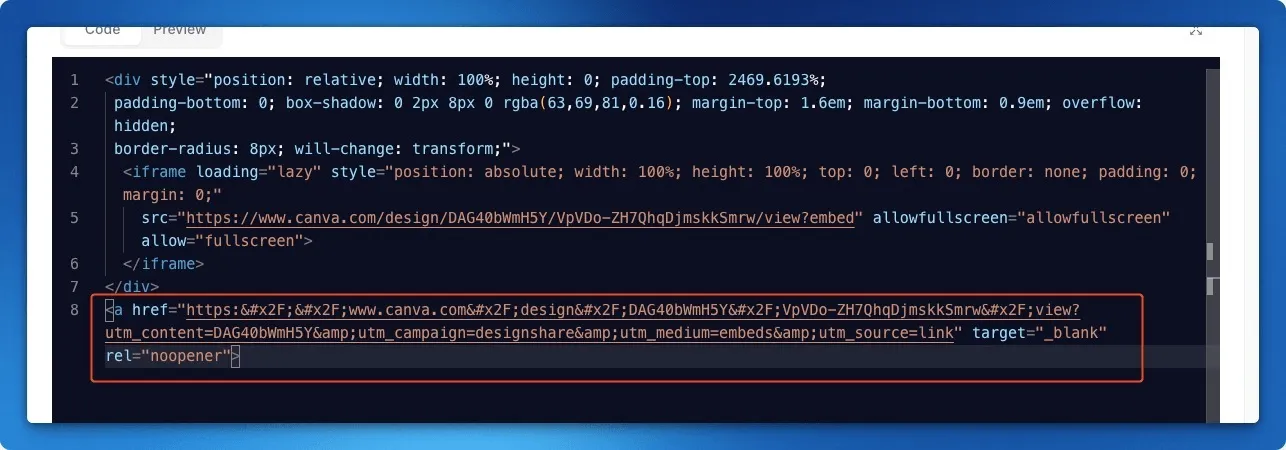
Section titled “Remove the extra Canva link”The embed code Canva gives you has two parts: a <div> with an <iframe> inside it, and then an <a href="https://www.canva.com/..."> link. Keep the first part and delete the link.
- Open the form and click Open HTML Editor.
- Find the line that starts with
<a href=and points tocanva.com. It sits right after the closing</div>. - Delete that line, including any text and the closing
</a>that follow it. - Click Save HTML.
- Click Back to return to the form, then click View Form to check the form now appears once.
If it still shows twice
Section titled “If it still shows twice”Check that you pasted the embed code only once, and that no other part of the Canva code is left below the </div>. Your HTML should end with </iframe> and </div> for the Canva part.
Common issues
Where do I paste the Canva embed code?
Set Type of Form to Custom HTML on the Payment Details tab, save the form, then click Open HTML Editor and paste the code there.
Can I use my Canva design as a single image instead?
Yes. Export the design as one image and use a sales page. That needs no HTML.
Was this article helpful?
Thanks for your feedback.
Sorry this didn't help. WhatsApp us and we'll sort it out with you.