
Sell digital products
To sell an ebook, template or online class, add a download link to the item on your payment form, then send it to the buyer in a custom email. The buyer gets the link automatically once the payment succeeds.
This works on forms that use Multiple Items. For access that cannot be shared, see Deliver digital products securely.
Add the download link to an item
Section titled “Add the download link to an item”Upload your file somewhere buyers can open it, such as Google Drive or Dropbox, and copy the link. Then:
- Go to Payments > Forms, then click Create Form, or open an existing form.
- Fill in Basic Information.
- On the Payment Details tab, set Price Setting to Multiple Items, then choose your Portal Key and Payment Option.
- Under List of Items, click Add Item and fill in the name, Amount (RM) and Stock.
- Click Add Payment Form or Update Form to save. The More button only works after the item is saved.
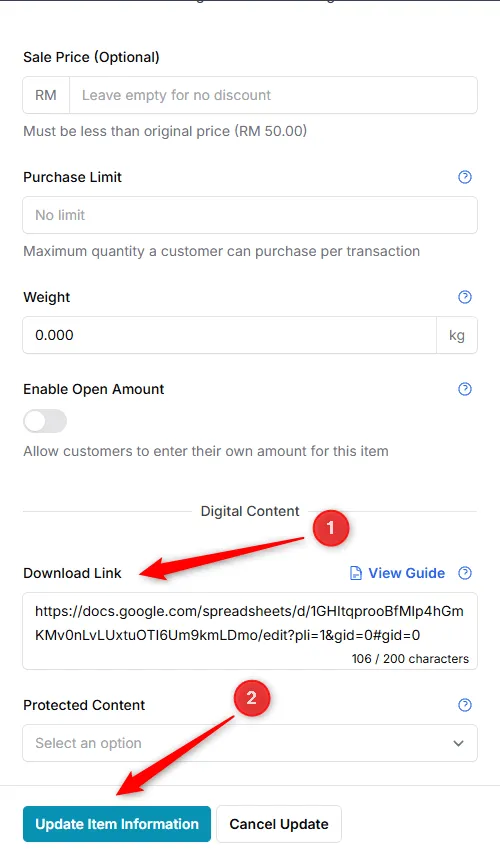
- Click More on the item.
- Under Digital Content, paste the link into Download Link. It must start with
https://. - Click Update Item Information.
Send the link by email
Section titled “Send the link by email”The download link reaches the buyer through the {product_table} variable in a custom email. Set it up once per form:
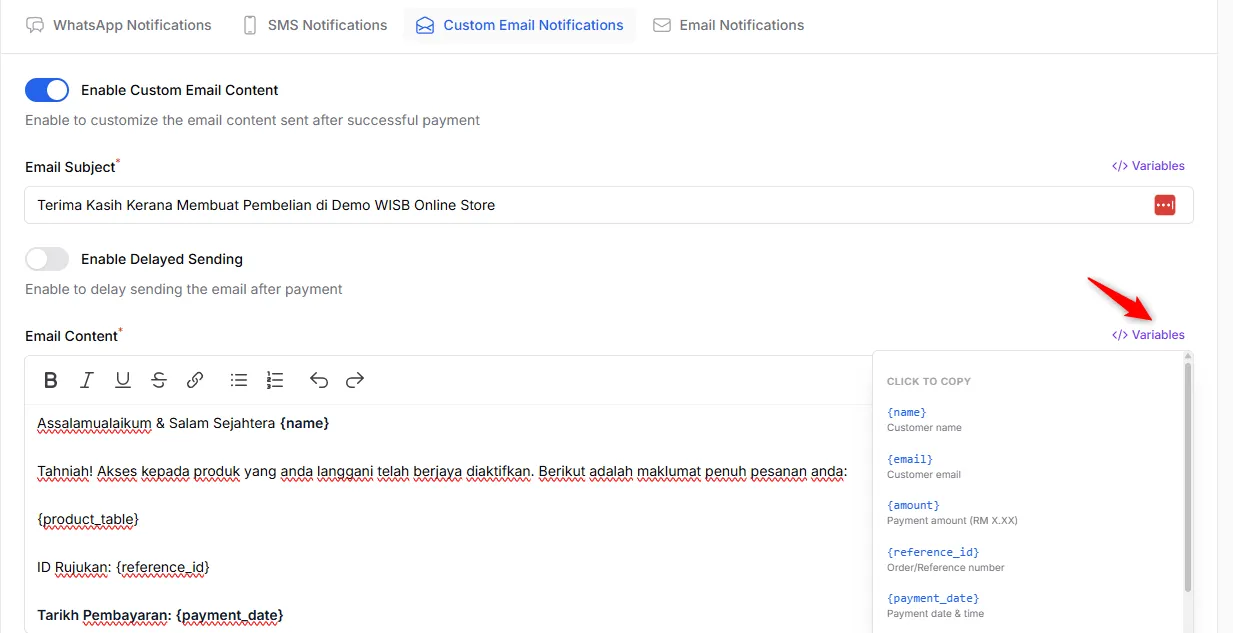
- Open the form and click Notifications at the top.
- Open the Custom Email Notifications tab and turn on Enable Custom Email Content.
- Fill in Email Subject.
- Write your message in Email Content and add
{product_table}. Click Variables to copy others, such as{name}or{reference_id}. - Type your address in the test field and click Send Test to see the email.
- Click Save Notification Settings.
{product_table} shows each item bought, with an Access button that opens its download link. BCL sends this as a separate email, in addition to the standard receipt email.
Common issues
My customer paid but did not get the download link. Why?
The link is only sent in the custom email. Open the form, go to Notifications > Custom Email Notifications, turn on Enable Custom Email Content and put {product_table} in Email Content.
The custom email is set up but my customer says it never arrived.
Ask them to check the Gmail Promotions tab, Spam or Junk, and search All Mail. If you need a download link nobody else can open, use protected content instead.
Can I use a Google Drive link instead of protected content?
Yes. Put the link in Download Link on the item. It needs no add-on, but anyone who gets the link can open it. Protected content needs an add-on and asks for a one-time code.
Was this article helpful?
Thanks for your feedback.
Sorry this didn't help. WhatsApp us and we'll sort it out with you.