
Share your BCL homepage
Your BCL homepage is one page that lists your forms, so you can share a single link instead of a link for each form. It lives at your subdomain, such as https://yourname.bcl.my, or at your own domain. Each form shows as a card with its featured image, title and a button to open it, newest first.
Open your homepage
Section titled “Open your homepage”To see your homepage as a customer would, click Quick Actions at the top of any BCL page, then View Homepage.
Choose which forms appear
Section titled “Choose which forms appear”New forms appear on the homepage by default. To hide or show a form:
- Go to Payments > Forms.
- Switch Front Page on or off for the form.
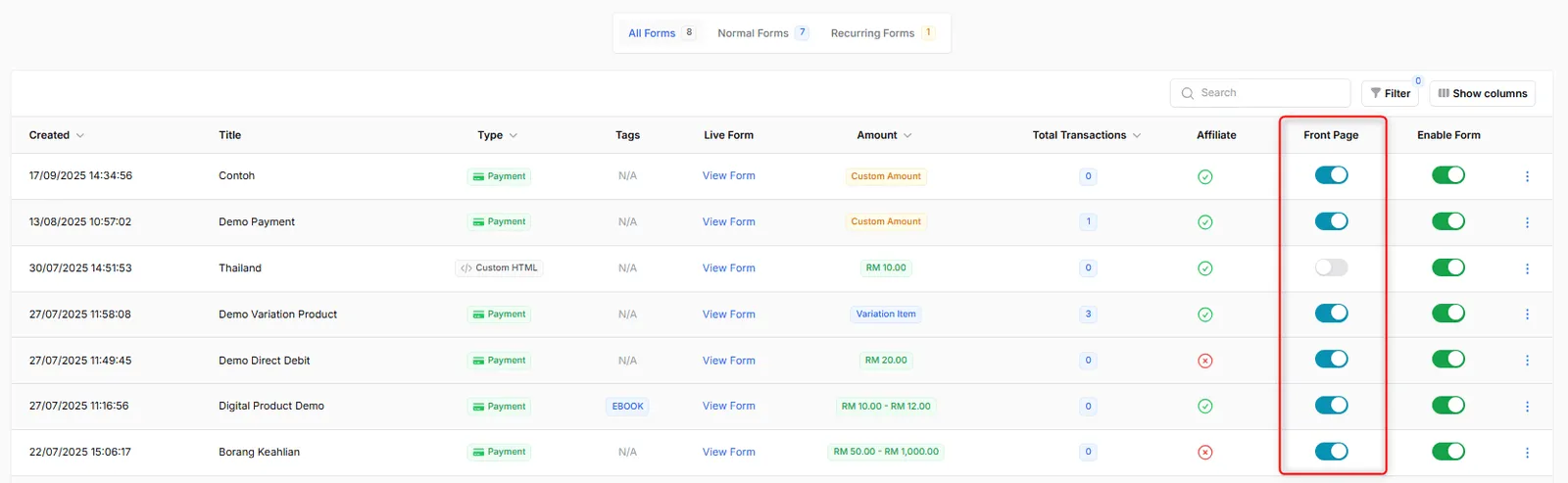
You can also change it inside the form: on the Form Configuration tab, switch Display on Homepage on or off. Event and booking forms have the same Front Page switch in their own lists.
Send visitors to one form
Section titled “Send visitors to one form”If you sell one main product, you can skip the list and open a single form instead:
- Go to Team > Team Profile.
- Under Homepage Settings, turn on Redirect to specific form.
- Choose the form type, then choose the form.
- Click Save Merchant Profile.
Common issues
Why is my form missing from my homepage?
Check two switches in Payments > Forms: Front Page and Enable Form must both be on. A disabled form never appears on the homepage.
Can my homepage open one form instead of the list?
Yes. In Team > Team Profile, turn on Redirect to specific form under Homepage Settings, choose the form and click Save Merchant Profile.
Was this article helpful?
Thanks for your feedback.
Sorry this didn't help. WhatsApp us and we'll sort it out with you.