
Show recent purchases on your form
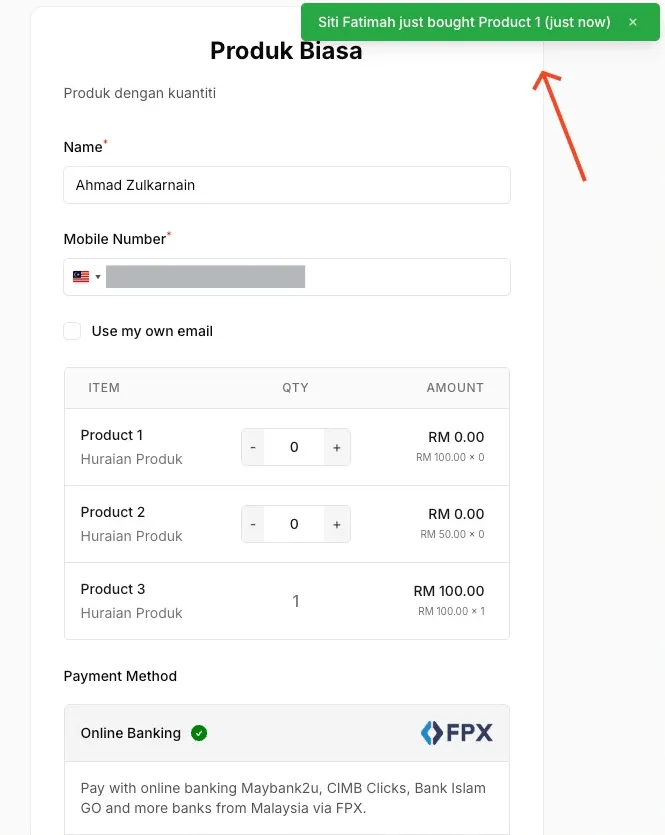
Social Proof shows small pop-ups on your form each time someone has paid, such as “Aina just bought Ebook Masakan (2 minutes ago)”. Seeing other people buy helps new visitors decide. It works on payment, event and booking forms.
Turn on Social Proof
Section titled “Turn on Social Proof”You can turn it on for any existing form:
- Go to Payments > Forms and open the form.
- Open the Miscellaneous Settings tab.
- Under Social Proof, turn on Enable Social Proof.
- Choose the settings you want:
- Time Period: how far back to show orders, from Last 24 hours to Last 30 days.
- Position: the corner of the screen where pop-ups appear.
- Shuffle Order: shows orders in random order on each visit.
- Text Color and Background Color: match the pop-up to your design.
- Click Update Form.
Here is how a pop-up looks on the form:
Common issues
I turned on Social Proof but no pop-up appears. Why?
Pop-ups only show paid orders from the Time Period you chose. If the form has no successful payments in that period yet, nothing appears. Try a longer period, such as Last 30 days.
What does the pop-up show?
The buyer's name as they entered it, what they bought and how long ago, for example "Siti just bought Product 1 (just now)".
Was this article helpful?
Thanks for your feedback.
Sorry this didn't help. WhatsApp us and we'll sort it out with you.