
Use your own domain
Your customers can reach your BCL forms on your own domain, such as order.yourshop.com, instead of a bcl.my address. You point the domain to BCL in your DNS, then switch it on in BCL.
Before you start
Section titled “Before you start”You need these before you set up a custom domain:
- A BCL account connected to an approved Bayarcash account. See Connect your Bayarcash account.
- The admin role in BCL.
- A domain you own, and access to its DNS settings at your domain provider or at Cloudflare.
Add the DNS record
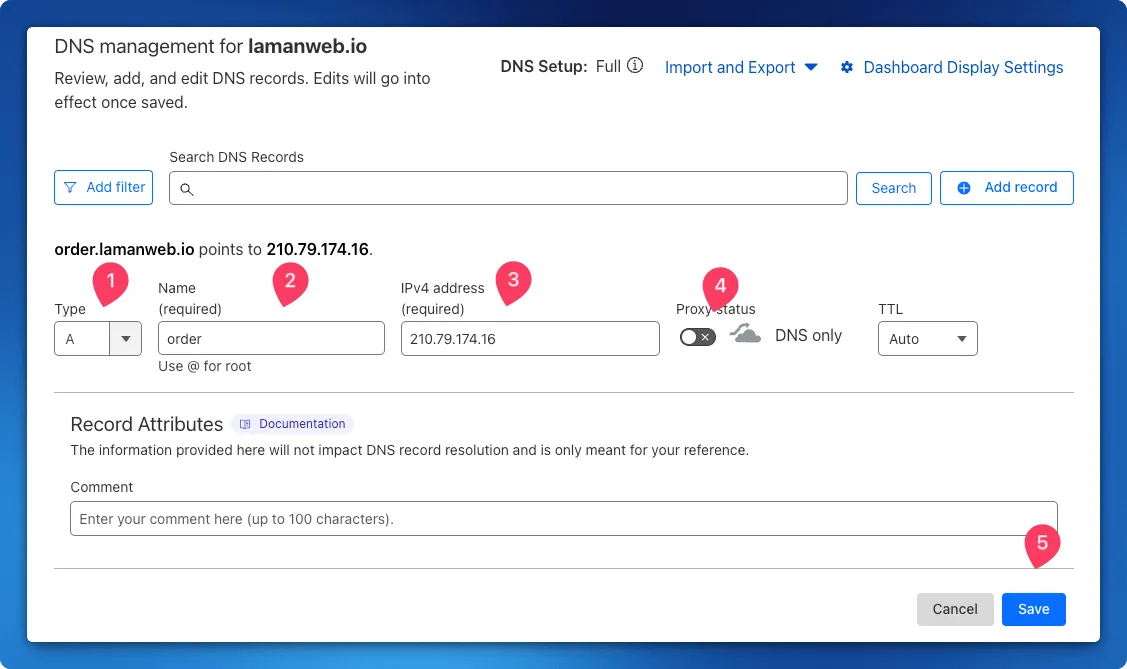
Section titled “Add the DNS record”At your DNS provider, add one record with these values:
- Type: A
- Name: the domain or subdomain you want to use, for example
orderfororder.yourshop.com - IPv4 address: 210.79.174.16
On Cloudflare, go to DNS > Records, click Add record, enter the values above and turn off Proxy status so it shows DNS only. Then click Save.
Turn on your domain in BCL
Section titled “Turn on your domain in BCL”After the DNS record is saved:
- Click your company name at the bottom of the sidebar and choose Team Profile.
- Under Custom Domain, turn on Use Custom Domain.
- In Domain, enter your domain without
https://, for exampleorder.yourshop.com. - Click Save Merchant Profile.
Once the DNS change has spread, your forms open on your domain. The Merchant Domain entry under Merchant Information shows the address BCL is using.
Common issues
Can my domain open a form straight away, without /form/ in the address?
Yes. Set your homepage to open one form, and your domain goes straight to it. See Set up your homepage.
I set everything up but my domain does not open BCL yet. Why?
DNS changes take time to spread across the internet. Wait a while and try again. On Cloudflare, also check that Proxy status is off (DNS only).
BCL says my domain is already in use. What does that mean?
Another BCL account has already saved that domain. Each domain can belong to one account only. Use a different subdomain, such as order.yourshop.com.
Was this article helpful?
Thanks for your feedback.
Sorry this didn't help. WhatsApp us and we'll sort it out with you.