
HTML form shortcodes
Shortcodes let your own HTML show live details from the form, such as an item’s price or how many are left in stock. BCL replaces each shortcode with the current value every time the page loads, so you never have to edit the HTML when a price or stock level changes.
Shortcodes work in a payment form whose Type of Form is Custom HTML. Type them in the HTML editor (Open HTML Editor), then click Save HTML.
Find an item’s ID
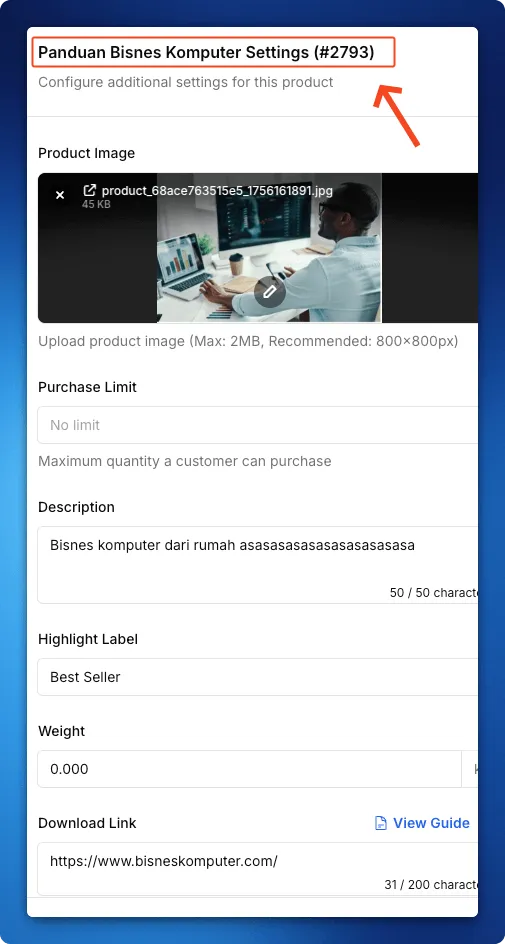
Section titled “Find an item’s ID”The item shortcodes need the item’s ID, and the form must use Multiple Items. To find the ID:
- Open the form and go to List of Items on the Payment Details tab.
- Click More on the item.
- Read the number after
#in the panel title, for example Settings (#2793).
Shortcode list
Section titled “Shortcode list”Replace 123 with your item’s ID. Each item shortcode also accepts id= in place of product=.
| Shortcode | Shows | Example output |
|---|---|---|
[stock product=123] |
Stock level | “25 available”, “Out of Stock”, or “In Stock” when stock is not tracked |
[price product=123] |
Item price | “RM 98.00” |
[product_name id=123] |
Item name | “Organic Carob Cider Vinegar” |
[status product=123] |
Status badge | “Available”, “Coming Soon” or “Out of Stock” |
[form_title] |
Form title | “Sales Page” |
[form_slug] |
Form URL slug | “sales-page” |
[total_products] |
Number of items on the form | “12” |
[available_products] |
Items that can be bought now (not upcoming, not sold out) | “8” |
Style the status badge
Section titled “Style the status badge”[status] outputs a <span> with the class badge plus badge-success (Available), badge-warning (Coming Soon) or badge-danger (Out of Stock). Add CSS for these classes in your HTML to colour the badge.
Common issues
My shortcode shows up as plain text on the form. Why?
Check the spelling and the brackets, for example [price product=123]. An unknown shortcode is left as it is. Shortcodes only work in the HTML of a Custom HTML form.
The price shortcode shows the old price, not my sale price.
[price] shows the item's Amount (RM). It does not show the Sale Price (Optional) set under More.
Was this article helpful?
Thanks for your feedback.
Sorry this didn't help. WhatsApp us and we'll sort it out with you.